Why Is My Floor Sweeper Not Picking Up Debris
A floor sweeper that stops picking up debris doesn't just create extra work, it disrupts your entire cleaning schedule, reduces operational efficiency, and can leave your facility looking neglected or create slip hazards from accumulated debris. In commercial and janitorial settings, your equipment needs to perform reliably every shift.
The good news is that poor debris pickup is almost always traceable to a specific, fixable cause. This guide walks through the most common reasons your floor sweeper isn't picking up debris effectively, from quick operator-level checks you can handle yourself to situations where you'll want to contact a certified technician.
Common Reasons Why Your Floor Sweeper Is Not Picking Up Debris
The issue could be as simple as a full debris tray or a clogged brush, or it could point to something deeper like a worn belt, a blocked air vent, or a machine that simply isn't suited for the job. Below, each cause is explained in detail so you can diagnose and resolve the problem quickly.
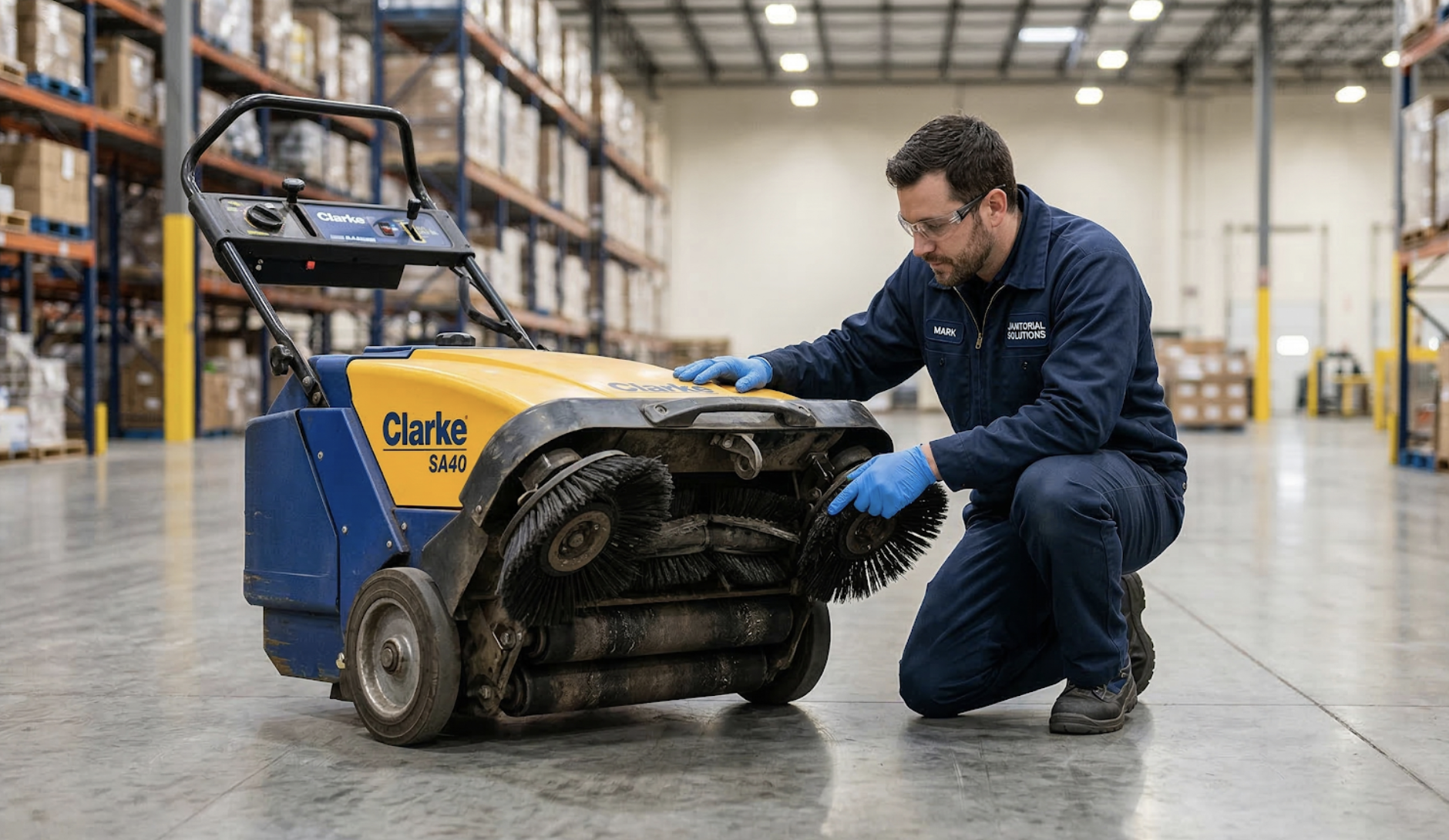
1. The Main Brush Is Worn Out or Not Spinning Properly
The main brush is the heart of your floor sweeper. If it's worn, misaligned, or obstructed, the machine won't collect debris effectively, no matter how many passes you make.
Signs of a Worn or Damaged Main Brush
Flat or frayed bristles are the most obvious indicator that your main brush needs attention. You may notice uneven sweeping patterns, or see debris being pushed aside rather than collected. If the brush looks visibly asymmetrical or worn down on one side, that's likely your root cause.
Debris Buildup in the Main Brush or Belt
Hair, string, and fine particulate debris are notorious for wrapping tightly around the brush motor shaft and lodging in the drive belt. This buildup restricts rotation and significantly reduces cleaning efficiency over time. Inspecting and clearing the brush after every use is one of the simplest habits you can build into your routine.
The Fix: Adjusting or Replacing the Main Brush
Start by checking the brush height setting, the bristles should make light, even contact with the floor surface. Consult your user manual for the correct adjustment procedure specific to your model. If the bristles are no longer making proper contact or the brush is heavily worn, replacement is the right call.
2. The Debris Tray or Hopper Is Full or Clogged
A full debris tray is one of the most common, and most overlooked, reasons a floor sweeper stops performing. Many operators continue running the machine without realizing it's reached capacity.
How a Full Hopper Affects Pickup Performance
When the debris tray is full, there's simply no room for incoming material, so it gets pushed aside or left on the floor entirely. Some machines have a sensor that automatically reduces suction power or prevents operation at capacity. Either way, the result is the same: ineffective pickup.
The Fix: Emptying and Cleaning the Debris Tray
Remove the tray, empty it completely, and inspect for any caked-on residue before reinserting it. Depending on your usage volume, hoppers should be emptied at minimum after every shift. While it's out, check for cracks or damage that could affect containment or airflow inside the machine.
3. The Side Brush Is Misaligned or Ineffective
The side brush is responsible for sweeping debris from edges and corners into the path of the main brush. When it isn't working correctly, large sections of floor near walls are left uncleaned, even if the rest of the machine is functioning perfectly.
Possible Cause: Incorrect Bristle Height
Bristle height is the most common culprit when the side brush underperforms. Set too high, the bristles won't make floor contact. Set too low, they'll lie flat and drag. Either extreme results in debris being left behind along baseboards and in corners.
The Fix: Adjusting the Side Brush
Use the adjustment dial to position the side brush so the bristles make light, even contact at the correct angle. If adjusting the height doesn't resolve the issue, inspect the bristles for wear, heavily worn side brushes lose their ability to direct debris toward the main brush and should be replaced.
4. The Filter Is Dirty or Clogged
Filters are easy to forget about, but they play a critical role in your sweeper's performance. A clogged filter restricts airflow through the machine, choking off its ability to draw in and retain fine debris, even when everything else is working correctly.
How a Clogged Filter Reduces Sweeping Performance
This is especially common in environments with heavy fine dust, such as warehouses, manufacturing facilities, or construction sites. As the filter becomes saturated, blocked air vents reduce the machine's suction power progressively. The result is a sweeper that appears to be running normally but leaves a fine layer of particulate behind with every pass.
The Fix: Cleaning or Replacing the Filter
Remove the filter and shake it out or rinse it, depending on the filter type specified in your user manual. Some filters are reusable after cleaning; others need to be replaced after a set number of operating hours. As a general rule, inspect filters weekly and clean or replace them on a schedule that reflects the intensity of your cleaning environment.
5. Brush Belt Issues (Too Loose, Too Tight, or Broken)
The drive belt transfers power from the motor to the main brush. If belt tension is off, or the belt is damaged, the brush won't spin properly, and debris pickup will suffer.
Signs of a Belt Problem
Watch for a brush that spins intermittently, slower than usual, or not at all. A burning rubber smell during operation is a strong indicator that the belt is slipping under improper tension. In some cases, the belt may have snapped entirely, which causes the main brush to stop spinning completely.
The Fix: Inspecting and Adjusting the Drive Belt
Check the belt for proper tension according to your machine's manual. Belts that are too loose will slip; belts that are too tight strain the brush motor and cause premature wear. Belts naturally loosen with regular use, so periodic tension checks should be part of your maintenance routine. If the belt is cracked, frayed, or broken, have it replaced by a certified technician, this isn't a repair to attempt without proper training.
6. The Floor Sweeper Is Not Suited for the Type of Debris
Sometimes the machine isn't the problem, it's a mismatch between the sweeper's capabilities and what you're asking it to do. Not all floor sweepers are built for all debris types or environments, and using the wrong machine produces poor results regardless of its condition.
Matching the Machine to the Job
Lightweight indoor sweepers are designed for fine dust and light debris on smooth surfaces. They'll struggle with large or heavy material, or outdoor environments with gravel, leaves, or construction waste. Conversely, heavy-duty industrial units may be exactly what's needed in a large warehouse or outdoor lot, but overkill, and potentially less effective, in a small retail space. Using a machine outside its intended application is one of the least recognized causes of poor sweeping performance.
The Fix: Choosing the Right Floor Sweeper for Your Application
If your sweeper is consistently leaving debris behind despite being in good mechanical condition, it may simply be the wrong tool for your environment. Consider surface type, debris size and volume, and whether the application is indoor or outdoor when evaluating your options. Browse PS Janitorial's full floor sweeper selection for guidance on matching the right machine to your facility's needs.
7. The Machine Is Being Operated Incorrectly
Even a perfectly maintained floor sweeper will underperform if it's not being used correctly. Operator technique has a significant impact on how effectively the machine picks up debris, and a few small adjustments can produce immediate improvements.
Operating Speed
Moving too quickly reduces the time the brush has to engage with debris. Most commercial floor sweepers have an optimal operating speed, typically a slow, controlled walking pace for push models or a low-speed setting on ride-on units. Slowing down is one of the easiest fixes your cleaning staff can make on the spot.
Overlapping Passes
Failing to overlap passes leaves strips of uncollected debris across the floor. Best practice is to overlap each pass by roughly 10–15% to ensure complete coverage, especially along edges where the main brush and side brush transition zones meet.
Brush Height Setting for the Floor Surface
Different surfaces require different brush height settings. A setting dialed in for smooth tile may sit too high on rough concrete, leaving debris behind. Check your user manual for the recommended brush height for each surface type, and adjust before each session if you're working across multiple floor types.
8. The Floor Surface or Environment Is Contributing to the Problem
In some cases, the floor itself, not the machine, is making debris pickup difficult. Environmental conditions can significantly affect how well your sweeper performs, even when both the equipment and the operator are doing everything right.
Wet or Damp Floors
Floor sweepers are designed to remove debris from dry surfaces. When floors are wet or damp, fine particles clump together and stick to the surface, making them far harder to sweep up. If your facility has moisture issues, address those first. For floors that are regularly wet, a floor scrubber is a more appropriate piece of equipment, and a better long-term investment for that environment.
Uneven or Damaged Flooring
Cracks, raised edges, and uneven floors prevent the brush from maintaining consistent contact with the surface. When the brush loses contact, even briefly, debris gets left behind. Uneven surfaces also accelerate brush wear and place additional stress on the machine's drive system over time.
Sticky Residue or Chemical Buildup
Residue from cleaning solutions, spills, or industrial processes can bond debris to the floor in a way a sweeper simply can't overcome on its own. In these situations, running a floor scrubber to loosen and lift the residue should precede any sweeping pass. PS Janitorial carries a full range of floor scrubbers suited to this type of application.
Preventive Maintenance Tips to Keep Your Floor Sweeper Running Effectively
The best way to avoid debris pickup problems is to keep them from developing in the first place. A simple, consistent maintenance routine extends the life of your machine and keeps it performing at its best between professional service visits.
Daily Maintenance
After every use, empty the debris tray completely and clear any material wrapped around the main and side brushes. Wipe down the machine exterior to prevent buildup on sensors, vents, and mechanical components. These steps take only a few minutes and prevent the most common performance issues before they take hold.
Weekly Maintenance
Once a week, clean or shake out the filter, inspect and adjust brush heights, and check belt tension. Examine the hopper for cracks or damage that could affect airflow or containment. Weekly checks catch developing problems early, before they turn into costly repairs or unplanned downtime that disrupts your cleaning schedule.
Monthly and Periodic Maintenance
On a monthly basis, perform a full inspection of all belts, brushes, electrical connections, and, if applicable, lead acid batteries, which can cause weak battery performance and reduced runtime if not properly maintained. Lubricate moving parts per the manufacturer's guidelines and review overall machine performance. For high-use machines, scheduling a periodic professional service inspection is strongly recommended.
Get Your Floor Sweeper Back to Peak Performance
A floor sweeper that isn't picking up debris is rarely a mystery, it's almost always one of a handful of common, diagnosable issues. Whether it's a worn main brush, a full debris tray, a clogged filter, a loose drive belt, or simply a mismatch between your machine and the job at hand, each problem has a clear solution. The key is knowing what to look for and staying on top of regular maintenance so small issues don't become bigger ones.
Browse PS Janitorial's full selection of floor sweepers and replacement parts, or reach out to our team for personalized equipment recommendations tailored to your facility's needs.